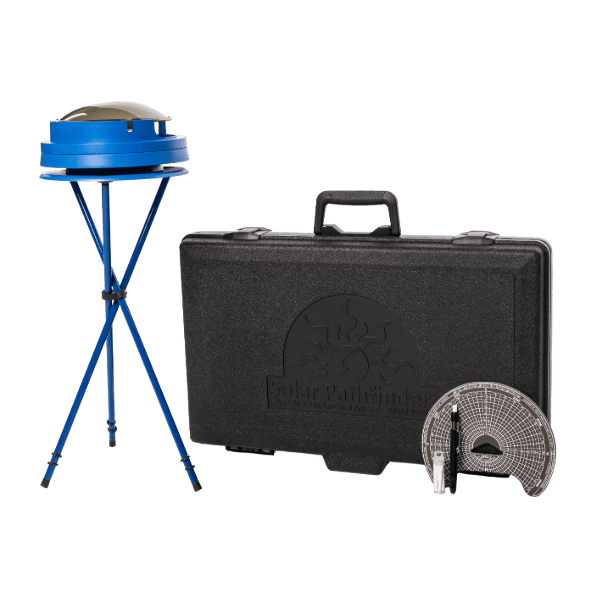
Description
Any scientific analysis is only as accurate as the least accurate input. Gross errors in structure orientation, solar system sizing, collector placement, component specification, and scientific studies can result when designers/engineers fail to accurately assess shading patterns at proposed building/ecological sites.
By combining the site-specific shading data of the SolarPathfinder™ with the published global weather data, an accurate solar site analysis can be made. This insolation data, on an hourly and monthly basis can then be applied to architectural, engineering, solar, and ecological applications. All of this data is integrated in the SolarPathfinder Assistant software, sold separately.
The SolarPathfinder™ is non-electronic. Simple and straight-forward in its engineering, it requires no special skills or technical know-how. One simple tracing does the job and becomes the permanent record for the solar data. When properly cared for, the unit will give the user years of accurate site analysis.
plastic domeThe SolarPathfinder™ uses a highly polished, transparent, convex plastic dome to give a panoramic view of the entire site. All the trees, buildings or other obstacles to the sun are plainly visible as reflections on the surface of the dome. The sunpath diagram can be seen through the transparent dome at the same time.
Because the SolarPathfinder™ works on a reflective principle rather than actually showing shadows, it can be used anytime of the day, anytime of the year, in either cloudy or clear weather. The actual position of the sun at the time of the solar site analysis is irrelevant. In fact, the unit is easier to use in the absence of direct sunlight. It could even be used on a moonlit night.
THE SUNPATH DIAGRAM:
The diagrams are application specific: “South-facing” (for Northern hemisphere) or “vertical” is for applications of 20-90 degrees tilt — usually solar; “Horizontal” is for applications of 0-20 degrees tilt — usually ecological.
The diagrams are latitude specific (the closer to the equator, the more the sun’s monthly paths will be overhead).
The rays depict solar time. The arcs depict average sun path for given month.
The small numbers given in half-hour increments give percentage of radiation for that half-hour.
For the flexibility of calculating radiation of any azimuth and any tilt angle, use our SolarPathfinder Assistant software in addition to the SolarPathfinder.
MAKE MAGNETIC DECLINATION ADJUSTMENT:
Pull out magnetic declination tab to adjust for magnetic declination.
Rotate diagram (use blue triangle) to make magnetic declination adjustment.
Line white dot up with proper declination value (negative numbers are left of the “0”; positive numbers are right of the “0”).
Push in magnetic declination tab to relock.
BASE SECTION:
Place base section where you want to make your site analysis, making it relatively level (the instrument section will “fine-tune” the leveling). If you are installing PV or thermal collectors, the unit needs to be approximately the same height and placement the panels/collectors will be.
NOTE: The telescoping legs of the tripod can be adjusted for leveling. Alternately, a bean bag can be used to help in leveling and to secure the unit from sliding off a pitched roof.
If using optional tripod, insert a ball-tip from a tripod leg into each of the grommets on the base section.
INSTRUMENT SECTION:
Set instrument section on base section.
Adjust bubble level so that bubble is in center of black circle (instrument section can rock/adjust on base section to do this).
Adjust unit so red arm of compass points north (for northern hemisphere).
DOME SECTION:
Place dome section on instrument section.
The SolarPathfinderTM is designed to be viewed from between 12-18 inches above the dome (if taking a digital photo, the camera should be between 12-18 inches above the dome) and directly above the vertical centerline on the sunpath diagram. Site readings are best taken on cloudy or overcast days to avoid glare from the sun. On a sunny day, block the sun’s image with your free hand.
CAUTION: DO NOT STARE AT THE REFLECTED IMAGE OF THE SUN ON THE PATHFINDER™ DOME.
When viewing the Pathfinder, you are looking for two things at the same time. First a reflective, panoramic view of the site will be seen on the dome. Simultaneously, the sunpath diagram will be seen through the dome. Where the reflected objects on the dome intersect the sunpaths shown through the dome, the site will be shaded at the time indicated on the diagram.
EXAMPLE:
The sun will not shine on this site until approximately 9:30 a.m. during the month of December. It will be shaded again in the afternoon from about 2:15 p.m. to 3:45 p.m.
In February, the sun will shine on the site from 9:15 a.m. throughout the rest of the day.
The manual gives detailed instructions on how to manually calculate the radiation information, however, we highly recommend using our Assistant software (sold separately) for fast, accurate, professional-looking reports.
The SolarPathfinder unit and PV Studio 2 software will created shade analysis reports similar to the Solmetric SunEye 210.


